

Reinstall the stock ROM
Page 7 of 8 - How to unlock the Orange San Francisco II for free
Introduction » Install the USB drivers » Download required files » Check FTM mode » Install QPST & Backup qcn » Restore qcn » Reinstall stock ROM » Comments
You're almost done! You just need to reinstall the stock ROM and your phone will be fully unlocked.
- You should see ClockworkMod Recovery on your phone, as shown below. If you do not see ClockworkMod Recovery, remove and reinsert the battery, wait 5 seconds, and then hold the Volume down button and Power on button until you see ClockworkMod Recovery.
- Use the Volume buttons on the side of your phone to highlight wipe cache partition.
- Press the Home button to select.
- Highlight and select Yes - Wipe Cache.
- Highlight and select wipe data/factory reset.
- Highlight and select Yes -- delete all user data.
- Highlight and select advanced.
- Highlight and select Wipe Dalvik Cache.
- Highlight and select Yes - Wipe Dalvik Cache.
- Press the Return / Back button once.
- Highlight and select Install zip from sdcard.
- Highlight and select choose zip from sdcard.
- Highlight and select the rom-stock.zip
- Highlight and select Yes - Install rom-stock.zip
- Wait for the ROM to finish installing. This may take up to 10 minutes.
- Highlight and select choose zip from sdcard.
- Highlight and select the kernel-stock.zip
- Highlight and select Yes - Install kernel-stock.zip
- Wait for the ROM to finish installing.
- Press the Back button and highlight and select reboot system now.
-
Your phone may take up to 10 minutes to boot, so be patient.
- Congratulations! Your phone is now fully unlocked - you can use any SIM card or network you like. If you wish, you may now install a custom ROM, but you will need to reinstall ClockworkMod Recovery to do so. If you wish to install a custom ROM, follow our guide here.
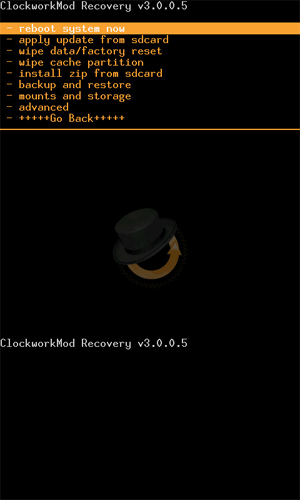
ClockworkMod Recovery. Ignore the version numbers and slight differences from the image above.

How to debrand / Install Custom ROMs / Android 4.0 from scratch
- 1. Introduction
- 2. Install the USB drivers
- 3. How to install ClockworkMod Recovery
- 4. How to choose and install a ROM
- 5. Comments
Popular Guides, Tutorials & Articles

How To Install Custom ROMs / Android 2.3 / Android 4.0 from scratch
- 1. Introduction
- 2. How to identify Gen 1 or Gen 2
- 3. How to root and install ClockworkMod Recovery
- 4. How to choose and install a ROM
- 5. Comments
Popular Guides, Tutorials & Articles
- How to unlock Orange San Francisco for free
- List of ROMs (updated regularly)
- An Introduction to the Orange San Francisco / ZTE Blade / ZTE Libra U-V880
- Why should I install a Custom ROM?
- What is rooting?
- What is ClockworkMod Recovery?
Other Guides, Tutorials & Articles